
A Walmart pay stub sits under My Money in OneWalmart and in the Me@Walmart app. That works until your last day, when the store login shuts off.
Locked out the week after quitting? Former associates use a separate door, the Money Network Pay Stub Portal, and Walmart’s own alumni page says terminated associates can use it too. Most people learn the difference while an apartment or benefits application is waiting on proof of income, so read the after-you-quit section before that spot arrives.
Where current associates find their Walmart pay stub
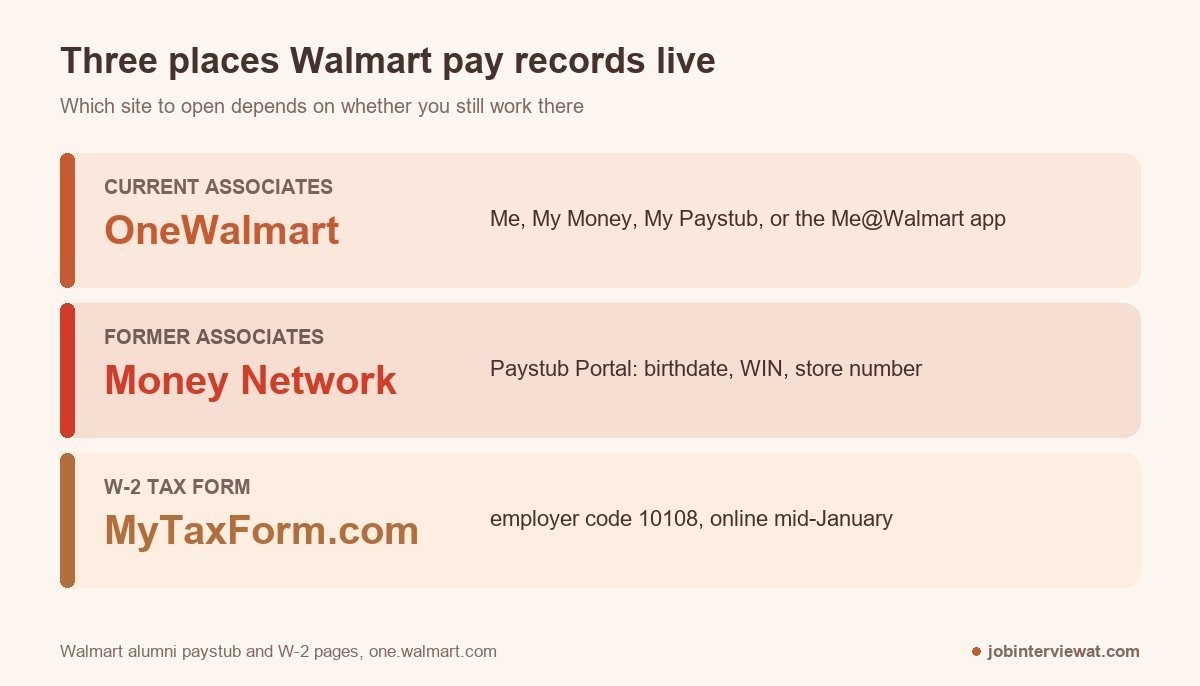
On OneWalmart, open the Me menu, then My Money, then My Paystub. Associates on r/walmart also point to a grey Paystub button just under the search bar on the home page, which skips the menus entirely. The Me@Walmart app shows the same stub with the same login.
OneWalmart sends a 2-Step Verification prompt at sign-in. Once the stub is open, use the print option, or your browser’s print dialog, and save it as a PDF. Do that for every stub that might matter later. The copy on your own drive is the one that’s still there after your last shift.
Payday has its own quirk. One r/walmart poster says the me@walmart view stays empty until around 11 or 12, so a blank screen at 7 a.m. doesn’t mean your pay is missing. It’s just not posted yet.
How do I get my Walmart pay stub after quitting?
Register at the Money Network Pay Stub Portal, which you reach from moneynetwork.com. Walmart’s alumni paystub page says all associates, including terminated associates, can view their stubs there. The registration form asks for your birthdate, nine-digit WIN, and store or facility number.
The lockout is the complaint former associates raise most. This is how one of them put it on r/walmart:
“I quit on the 28th, and I can’t see my Pay stubs, is there any way AT ALL to access them, I need them to apply to SSI.”
Former associate, r/walmart
There’s a route, and it doesn’t depend on anyone at the old store picking up the phone.
The registration steps
Walmart’s alumni page lists them in this order:
- Go to moneynetwork.com.
- Click Login in the top right corner and choose “Money Network Service for Walmart” from the drop-down list.
- Select “Paystub Portal” at the top of the page.
- If you’ve never logged in, select “Register Now” and follow the prompts.
The registration screen wants your birthdate as MMDDYY, your nine-digit WIN, and a facility number of up to five digits. That number is your store or club number, DC number, or department number for Home Office roles. The portal also notes that new users create a User ID and password.
When you don’t have your WIN or store number
The registration page carries a “Don’t know WIN?” link that switches the check to your hire date. A store number usually sits on an old stub or in your onboarding paperwork. Walmart’s alumni pages also list a live chat with a payroll specialist, Monday through Friday, 8:30 a.m. to 4:55 p.m. CST, for registration trouble.
Expect the verification to ask for more than the official page lists. A poster in r/WalmartEmployees reported the process this way:
“You’ll need to register and get “verified” (name on pay stubs, WIN number, DOB, Address, and email and phone for codes), but it works.”
r/WalmartEmployees
If the portal still won’t let you in, the people lead at your old store is the human fallback. What they can pull varies, so name the exact pay periods you need; they’ll work faster with dates.
Don’t trust any site that offers to generate a Walmart stub from typed-in numbers. It produces a document, not a payroll record, and a lender or landlord who verifies income against payroll can reject it.
Your Walmart W-2 comes from a different site
Need the form for tax season? Stubs and tax forms travel separate roads. Walmart’s alumni W-2 FAQ sends you to MyTaxForm.com, where you enter employer code 10108, choose Register now, and create a one-time passcode, User ID, and password.
Paper copies are postmarked by January 31, and online copies should be available in mid-January. You must be signed up for online delivery to see the form online before February 1; after that date, signing up isn’t required. If tax software asks for the employer ID, the same page lists Walmart’s federal tax ID as 71-0794409.
What the stub shows and when it posts
A stub breaks gross pay (hours times your rate) into net pay (what lands in your account) and lists the taxes and deductions in between. Federal and state income tax, Social Security and Medicare, and any benefit plans you enrolled in are the usual lines. Layouts change, so match each line against your own shifts; a screenshot from a forum won’t reflect your plan.
Payroll guides in 2026 describe Walmart’s hourly pay as every two weeks, with deposits landing on Thursday for most locations. Check your own payday inside OneWalmart before you count on a date, since calendars can shift by location and holiday. The same guides note Walmart’s earned wage access through the OnePay app, formerly Even; that app handles early pay, and it isn’t where stubs live.
Hours look short? Check that your time was recorded and approved, then bring your own record of the shifts to your people lead. New hires wondering why the first check feels late? Your first hours fall into a pay period that’s already running, so payroll guides put the first payday two to four weeks after your start date. The Walmart starting pay guide covers what the rate should be, and the Walmart orientation guide covers your first days on the clock.
Walmart pay stub FAQ
How do I get my pay stub from Walmart?
Current Walmart associates sign in to OneWalmart, open Me, then My Money, then My Paystub, or use the Me@Walmart app with the same login. The stub can be printed or saved as a PDF from the page.
How do I get my Walmart pay stubs after quitting?
Former associates register at moneynetwork.com by choosing “Money Network Service for Walmart,” then “Paystub Portal,” then “Register Now.” You’ll need your birthdate, nine-digit WIN, and store or facility number.
When does Walmart pay?
Payroll guides describe Walmart’s hourly pay as every two weeks, usually on Thursday. Confirm your exact payday in OneWalmart, and expect the stub to post later in the morning than the deposit.
How do I get my W-2 from Walmart?
Walmart W-2s are on MyTaxForm.com under employer code 10108. Online copies should appear in mid-January, and paper copies are postmarked by January 31.