

A time tracking app for contractors ties each worker’s hours to a specific job, so you can see what every project really costs in labor. For a crew of 10 plus one office admin, the five apps below cost between $0 and $160 a month on the cheapest plan with job-level hours and GPS.
Labor is the cost that slips away fastest. Crews move between sites, start early, stay late and fill in paper timesheets days later. It’s also the cost owners worry about most: in the 2026 Construction Hiring and Business Outlook from AGC and Sage, 56% of 951 contractors surveyed named rising direct labor costs as a concern for the year. A good time tracking app for contractors won’t lower wages, but it shows you where the hours went.
Contractor time tracking at a glance
- Cheapest with job costing: busybusy Free, $0 for unlimited users
- Flat price for small crews: ezClocker Standard, $30 a month for up to 30 employees
- Watch the 11th user: Connecteam’s free plan stops at 10 users, and archived users count
- Admin seats cost money: Clockify bills every active or invited user, owner and admins included
- QuickBooks shops: QuickBooks Time needs a QuickBooks Online subscription on every plan
- Travel between sites: counts as hours worked for covered employees under 29 CFR 785.38
What is a time tracking app for contractors?
It’s a digital time clock built for crews who work away from an office. Workers clock in and out on their own phones or on a shared tablet at the job site, instead of punching a card on a wall.
The useful ones do more than count hours. They tie time to a job, save a location stamp at clock-in, and export timesheets your payroll person can use without retyping. That job-level data is what turns a time clock into a labor costing tool. Without it, you’ll only know how many hours you paid for, not which job ate them.
Which features matter for labor job costing?
Most small crews need five features to price labor by job: easy clock-in, job-level hours, GPS stamps, payroll exports and pricing you can predict. Everything else is a nice extra you can add later.
- One-tap clock-in: if workers need training, they’ll skip it. Apps that run on both Apple and Android phones keep adoption high.
- Job-level hours: you can’t price labor per project unless each punch is tied to a job.
- GPS stamps: a location saved at clock-in and clock-out settles most “was he on site?” arguments.
- Payroll-ready exports: a CSV or direct sync your payroll provider accepts.
- Predictable pricing: check the base fee, the per-user fee and who counts as a user, not just the headline price.
Travel time belongs on that list too. The federal rule at 29 CFR 785.38 says travel from job site to job site during the workday must be counted as hours worked. If your app only records the first punch and the last one, those drive minutes still have to reach payroll somehow.
Owners who’ve shopped for these tools describe the same starting point. One reviewer on r/TimeTrackingSoftware tested ten options after years of messy crew timesheets:
“If you’ve ever juggled timesheets for a construction crew, you will understand how messy it gets. Punch cards, WhatsApp check-ins, even group chats with “clock in/out” messages. I have been there. So, I took the time to test the time tracking softwares suggested by most people, specifically those built for on-site crews and multi-location teams. Here’s what I found. * Live GPS location & geofencing were non-negotiables. Too many job sites = too much room for error. * Project tracking and assign…” [excerpt — 3,776 characters in full]
– r/TimeTrackingSoftware, December 2025 (16 upvotes)
What do these apps cost a 10-person crew?
Headline prices don’t tell you much, because each vendor counts users differently. So we priced one common setup: 10 field workers plus one office admin, billed monthly, on each app’s cheapest plan that lists job or project hours and GPS.
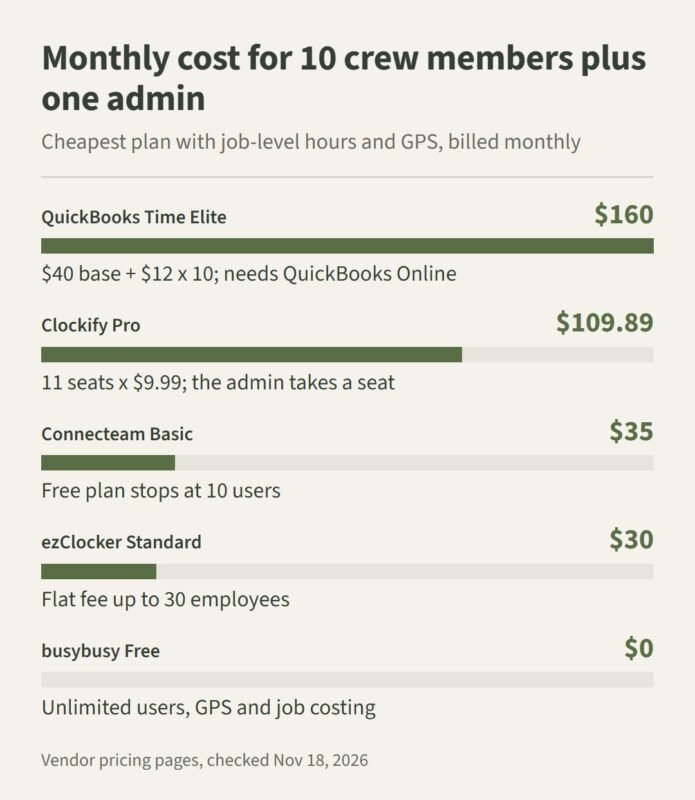
How we priced it: we read each vendor’s public pricing page on November 18, 2026, picked the lowest plan listing job or project tracking plus GPS, and multiplied by 11 people where billing is per user. The sample is one crew size on monthly billing. It leaves out promotions, taxes, add-ons and the QuickBooks Online subscription, and vendors change prices often, so recheck before you buy.
| App | Plan used | Monthly cost | How the math works |
|---|---|---|---|
| QuickBooks Time | Elite | $160 | $40 base (includes one admin) + 10 x $12 |
| Clockify | Pro | $109.89 | 11 seats x $9.99; the admin takes a seat |
| Connecteam | Operations Basic | $35 | Flat for the first 30 users; 11 users is over the free limit |
| ezClocker | Standard | $30 | Flat for up to 30 employees |
| busybusy | Free | $0 | Unlimited users on the free plan |
The spread is wider than most owners expect. Per-user billing climbs with every hire, while flat plans stay put until you cross a tier.

The 5 apps compared
Each app below is judged on the same points: who it fits, how it handles job costing and GPS, what it costs, and the catch.
1. ezClocker
Best for: small contractors who want a flat monthly price and an app crews can use without training.
Job costing and GPS: workers clock in with one tap on Apple or Android phones, and a GPS stamp is saved at clock-in and clock-out. Any tablet can run as a kiosk time clock for workers without smartphones. For job costing, ezClocker exports timesheets showing hours on specific jobs, which you can group by project to see total labor hours on each one.
Price: Basic is $15 a month for up to 15 employees, Standard is $30 for up to 30, and Premium is $60 for up to 60. Annual billing gives you two months free, and there’s a 30-day free trial.
Plan limits: job assignments, overtime reports and payroll integrations start on Standard. If job costing is why you’re buying, price the $30 plan, not the $15 one.
2. busybusy
Best for: construction companies that want to try job costing before paying anything.
Job costing and GPS: it’s built for construction crews, and the free plan includes GPS time tracking, job costing and equipment tracking for unlimited users. That’s unusually generous, and it’s the easiest way to test job costing with your real crew.
Price: Free covers unlimited users. Pro is $11.99 per user a month billed monthly, or $9.99 billed annually, plus a $40 monthly admin license.
Plan limits: once you need Pro features, the per-user fee and the admin license stack up. For 10 workers on monthly billing, that’s well past the flat-price apps.
3. Clockify
Best for: very small crews, or teams that mostly need time reports by project.
Job costing and GPS: project time reports are its strength. GPS tracking, scheduling, expenses and labor cost sit on the Pro plan. Kiosk mode starts on Basic, with limited kiosk-only seats for workers who just clock in and out.
Price: Free covers up to five users. Basic is $4.99 a seat a month billed monthly, and Pro is $9.99 a seat billed monthly or $7.99 billed annually. Limited kiosk seats start at $0.79 a month on annual billing.
Plan limits: every active or invited user takes a seat, including the owner and admins. Your office manager isn’t free.
4. Connecteam
Best for: crews that want time tracking, scheduling and team chat in one app.
Job costing and GPS: GPS clock-in and clock-out, plus scheduling and messaging in the same place. That’ll cut down on the separate group chat most crews already run.
Price: the Small Business Plan is free for up to 10 users. Operations Basic is $29 a month billed annually or $35 billed monthly for the first 30 users, then $0.80 to $1 for each extra user.
Plan limits: Connecteam’s help center says archived users count toward the free plan’s 10-user limit. Add one hire, or keep last season’s laborers in the system, and you’re on a paid plan.
5. QuickBooks Time
Best for: contractors who already keep their books in QuickBooks Online and want hours to flow straight into it.
Job costing and GPS: mobile clock-in for field crews and a direct link to QuickBooks accounting. Project tracking, mileage tracking and estimates versus actuals sit on the Elite plan.
Price: Premium is $20 a month plus $10 per user. Elite is $40 a month plus $12 per user, and the base fee covers one admin. A free trial is available.
Plan limits: every plan needs a QuickBooks Online account, which you pay for separately. It’s the priciest option here unless you’d already pay for QuickBooks anyway.
Which app fits your crew?
Start with the feature you can’t live without. What do you actually need the app to prove? If it’s job costing, confirm that the plan you’re pricing includes job-level hours and exports, not just clock-in.
Then match the pricing model to your crew. Under 10 people with no growth plans? A free plan may be enough. Hiring through the season? A flat plan like ezClocker Standard or Connecteam Operations Basic stays predictable. Already paying for QuickBooks Online? The sync may be worth the higher price.
Plan for the day your needs change, too. A commenter in the same r/TimeTrackingSoftware thread warned about outgrowing simple tools:
“Solid breakdown. We went through a similar evaluation on the construction + field ops side. One thing I’d add: a lot of teams outgrow “GPS + punch-in” tools once they start mixing site work with remote coordination. We ended up needing geofencing and mobile punch-ins *plus* workflow visibility (idle patterns, site vs office hours, remote logins, etc.) in one system. Tools optimized only for job sites work great early, but hybrid field + remote setups tend to need something more flexible.”
– r/TimeTrackingSoftware, December 2025 (3 upvotes)
Next, test it in the field. Have two or three workers use the app for a full pay period, and watch how they handle site changes and missed punches. If you’re weighing tools beyond construction, this time tracking software comparison covers office and remote teams.
Finally, send a sample export to whoever runs payroll. A report that looks clean on your screen still has to load in their system. If you also manage office staff, it’s worth reading how HR systems track attendance without micromanaging before you roll anything out.
Time tracking app for contractors: quick answers
What is the cheapest time tracking app for contractors?
busybusy’s free plan covers unlimited users with GPS and job costing. Among paid plans, ezClocker Standard ($30 a month for up to 30 employees) and Connecteam Operations Basic ($35 a month billed monthly for the first 30 users) stay flat as a small crew grows.
Is Clockify actually free?
Yes, for up to five users. GPS tracking, scheduling and labor cost need the Pro plan, which is $9.99 per seat a month on monthly billing, and admins take a seat too.
How do time tracking apps help with labor job costing?
They tie each worker’s hours to a job. Once hours are grouped by project, multiply them by your loaded labor rates to see what each job really cost, then use that number to price the next bid.
Do contractors need GPS time tracking?
It isn’t required, but it’s useful. A GPS stamp at clock-in and clock-out shows where workers started and finished, which cuts down on disputes over hours.
Is travel between job sites paid time?
For covered employees, yes. Under 29 CFR 785.38, travel from one job site to another during the workday counts as hours worked, so your process needs to record those minutes.
Can workers without smartphones still clock in?
Yes. ezClocker turns any tablet into a kiosk, and Clockify sells limited kiosk-only seats, so workers can clock in at the site without their own phones.